Your MT4 & MT5 accounts,
one click away
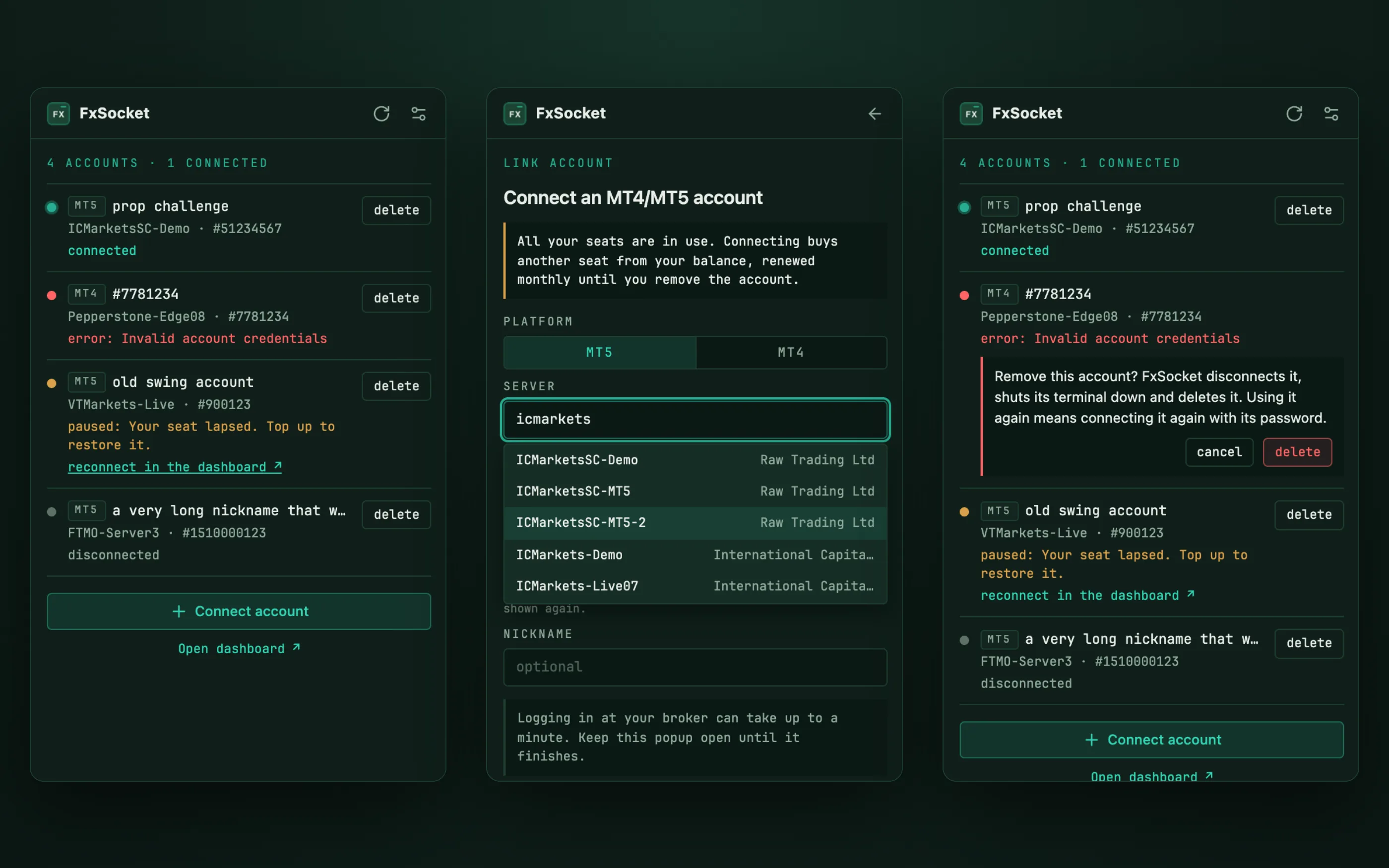
FxSocket Manager is a free Chrome extension for your FxSocket account. It shows every MetaTrader 4 and MetaTrader 5 account you have linked, with its live status, and lets you connect a new account or remove an old one from the browser toolbar, without opening the dashboard.
What it does
Every account and its status
Each account shows its platform, server, login and nickname next to its status: connected, still connecting, paused by billing, or failing with the reason the broker or the terminal gave. While an account is coming up, the list refreshes on its own until it is live.
Connect without the dashboard
Pick MT4 or MT5, type a few letters of your broker's name and choose the server from the list, then enter the login and password. If all your seats are in use, the form says so before you connect, and whether the new account buys a seat from your balance or needs a bigger plan.
Remove in two clicks
Removing an account disconnects it, shuts its terminal down and frees the seat. A confirmation step sits between the click and the delete.
Set up in a minute
Add it to Chrome
Install FxSocket Manager from the Chrome Web Store and pin it to the toolbar.
Copy your API key
Open the API Key page in the dashboard and copy your key. The full key (fxs_live_) can connect and remove accounts; a read-only key (fxs_ro_) shows the list and nothing else.
Paste it once
Open the extension, read what it does with your data, and paste the key. It stays on this device until you remove it in the extension's settings.
Your key is on the API Key page once you are signed in. No FxSocket account yet? Pick a plan and link your first MetaTrader account.
What it can see and send
- Only FxSocket. The extension talks to FxSocket's own servers over HTTPS and to nothing else. It has no access to the websites you visit.
- Your key stays in Chrome. The API key sits in Chrome's extension storage on your device and only goes out with requests to the FxSocket API.
- Passwords pass straight through. A broker password goes to FxSocket, which stores it encrypted and uses it only to log your terminal in. The extension never keeps it.
- No tracking. No analytics, no ads, no third-party scripts.
The details are in the privacy policy.
Questions
What does it cost?
The extension is free. The accounts it manages run on your FxSocket account, which is €12 per MetaTrader account per month on Starter, with flat plans for larger setups.
Can it place trades?
No. The extension lists, connects and removes accounts. It never places, changes or closes an order.
Do I need the full API key?
Only to connect and remove accounts. With a read-only key the extension shows your accounts and their status, and the connect and delete buttons stay hidden.
Why does an account say paused?
Billing has paused it because its seat is unpaid. Once the seat is paid for, reconnect the account from the dashboard.
Does it work in Edge or Brave?
It is built for Chrome. Microsoft Edge and Brave can install it from the Chrome Web Store as well.
What happens to my key when I uninstall it?
Chrome deletes the extension's storage along with it, key included. To retire the key itself, rotate it on the API Key page; the old key stops working at once.
The extension is a small client of the accounts API, so anything it does you can script yourself, with the Python and Node.js SDKs or plain HTTP.